
Anysite MCP Server v2: 5 Tools, All Endpoints, Server-Side Analysis
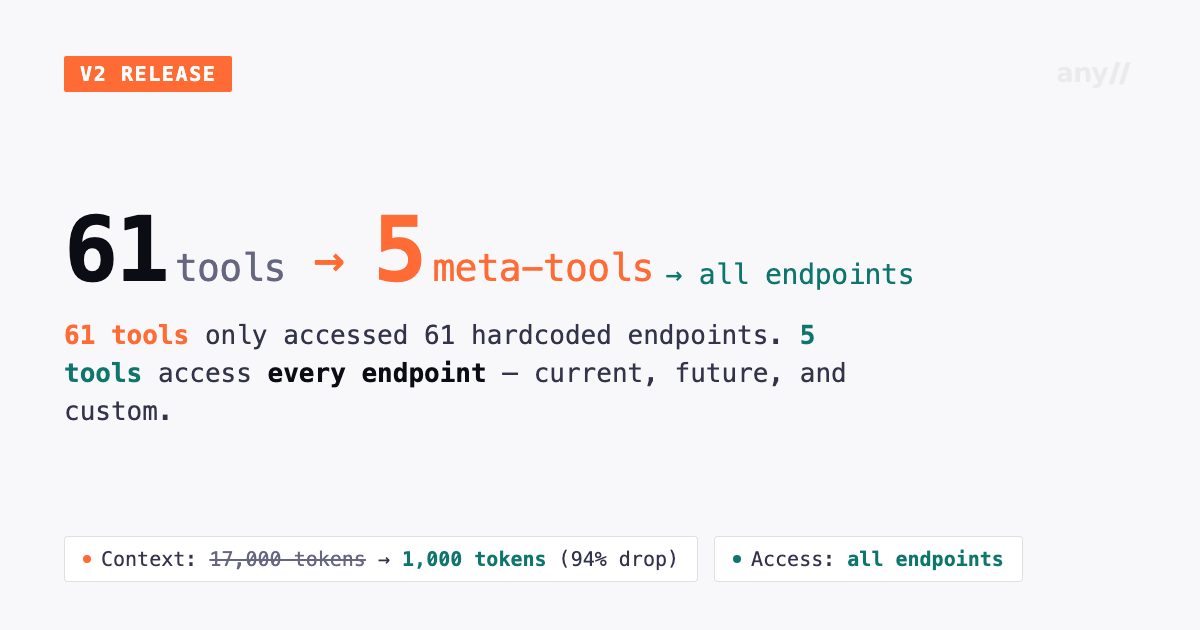
V1 had 61 tools and could access 61 endpoints. V2 has 5 tools and can access every endpoint — including ones that don't exist yet.
That's the counterintuitive result of replacing hardcoded tool-per-endpoint mappings with dynamic meta-tools. Fewer tools, total coverage. The 61 individual tools are gone. In their place: 5 meta-tools that discover and access all available endpoints dynamically, add server-side data analysis, and consume a fraction of the context the old design required.
This article covers what changed, what broke, and what you need to do.
The Problem v1 Created
The v1 MCP server worked by exposing one tool per API endpoint. search_linkedin_users, get_linkedin_profile, get_twitter_user, search_reddit_posts — a separate, named tool for every operation across every platform.
This design had a structural flaw: all 61 tool definitions, with their full parameter schemas, loaded into the LLM's context at the start of every conversation. That was roughly 17,000 tokens consumed before you asked a single question — a significant chunk of available context window spent on tool definitions alone.
The second problem was tool selection. With dozens of similarly named tools, the LLM frequently picked the wrong one or asked for clarification when the intent was obvious. The tool list had become a liability.
The third problem was extensibility. Adding a new data source meant writing a new MCP tool by hand, with hardcoded parameters — a manual process that created lag between API capabilities and MCP availability.
What v2 Changes
V2 replaces the entire tool catalog with 5 universal meta-tools.
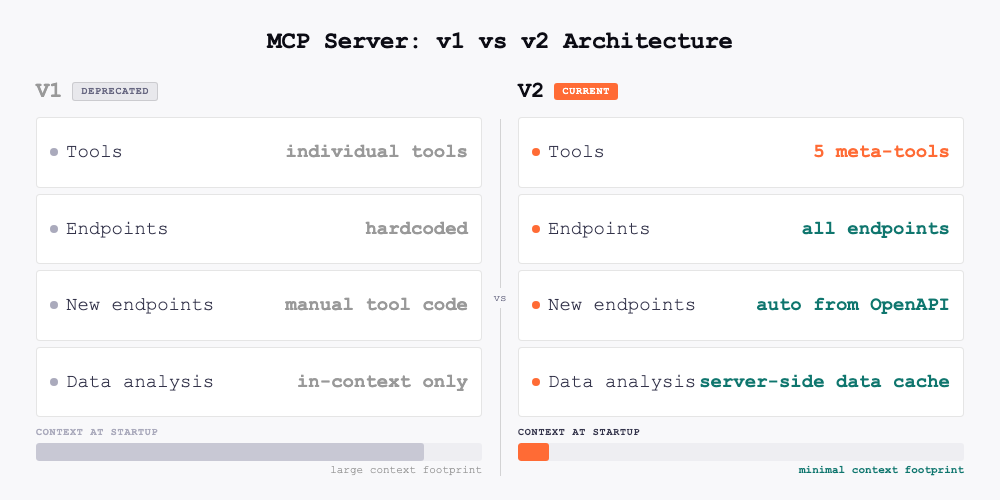
| v1 | v2 | |
|---|---|---|
| Tools | 61 individual | 5 meta-tools |
| Endpoint access | 61 hardcoded endpoints | All endpoints — current and future |
| Context at startup | ~17,000 tokens | ~1,000 tokens |
| Data sources | ~35 hardcoded | 40+ dynamic + custom |
| New endpoint support | Manual tool code required | Automatic from OpenAPI spec |
| Data analysis | In-context only | Server-side via data cache |
| Pagination | Not supported | Built-in via get_page |
| Export | Not supported | JSON, CSV, JSONL |
| Cache | None | 7-day server-side data cache |
Context usage drops from ~17,000 tokens to ~1,000 — a 94% reduction. But the access expands: 5 tools now reach every endpoint on the platform, not just the 61 that had hardcoded tool definitions. The LLM has room to reason about your actual request instead of managing a catalog of names.
The 5 Meta-Tools
discover
discover tells the LLM what endpoints exist for a given platform and what parameters they accept. It is the entry point for any workflow — you call it first to understand what is available before making any data requests.
discover("linkedin", "user")
Returns endpoint names, parameter schemas, and usage hints. Since endpoints are loaded dynamically from the Anysite OpenAPI spec at startup, new platforms and custom endpoints you build through the Custom Endpoint Builder appear here automatically.
execute
execute fetches data from any endpoint by name. This is the call that actually retrieves records.
execute("linkedin", "user", {"user": "darioamodei"})
Returns the first page of results plus a cache_key. Every result set is automatically stored in a server-side data cache with a 7-day TTL — which is what makes the remaining three tools possible.
get_page
get_page paginates through a cached result set without making a new API call.
get_page(cache_key, offset=10)
V1 had no pagination. If you wanted the next batch of results, you had to re-execute the query. V2 caches everything and lets you page through it freely.
query_cache
query_cache is the most significant new capability. It runs filter, aggregate, and sort operations against cached results server-side — without loading raw data into the LLM's context.
In v1, analyzing 50 LinkedIn profiles meant all 50 result objects were returned into context. Filtering to those in San Francisco required the LLM to process every record. With large datasets, this hit context limits entirely.
query_cache moves that computation to the server:
Filter:
query_cache(cache_key, conditions=[
  {"field": "location", "op": "contains", "value": "San Francisco"},
  {"field": "followers", "op": ">", "value": 500}
])
Aggregate:
query_cache(cache_key, aggregate={"field": "followers", "op": "avg"})
Group by:
query_cache(cache_key, aggregate={"field": "followers", "op": "count"}, group_by="industry")
Sort:
query_cache(cache_key, sort_by="followers", sort_order="desc", limit=10)
Supported filter operators: =, !=, >, <, >=, <=, contains, not_contains. Aggregation functions: sum, avg, min, max, count, uniq.
export_data
export_data downloads the full contents of a cache as a file.
export_data(cache_key, "csv")
Supported formats: JSON, CSV, JSONL. Returns a download URL. Files are available for 7 days, matching the cache TTL.
A Complete Workflow Example
Here is how these tools work together in practice. The goal: find LinkedIn profiles of ML engineers, filter to those in the Bay Area with over 500 followers, and export for outreach.
1. discover("linkedin", "search")
   → Returns available search endpoints and their parameters

2. execute("linkedin", "search", "search_people", {"keywords": "ML engineer", "count": 100})
   → Returns first 10 results + cache_key

3. get_page(cache_key, offset=10)
   → Next 10 results from cache (no API call)

4. query_cache(cache_key,
     conditions=[
       {"field": "location", "op": "contains", "value": "Bay Area"},
       {"field": "followers", "op": ">", "value": 500}
     ],
     sort_by="followers", sort_order="desc"
   )
   → Returns filtered, sorted results server-side

5. export_data(cache_key, "csv")
   → Download URL for the full filtered dataset
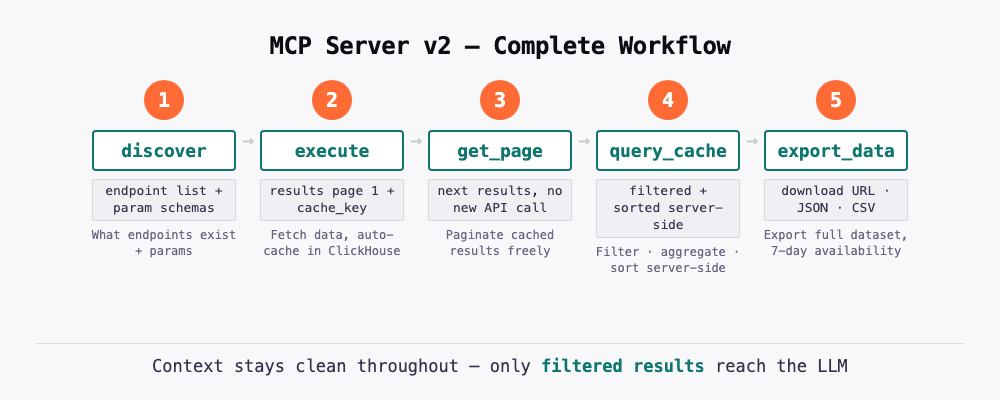
The LLM's context stayed clean throughout. Only the filtered results and download URL ended up in the conversation.
Breaking Changes
All individual tool names are removed
Every named tool from v1 — search_linkedin_users, get_linkedin_profile, get_twitter_user, search_reddit_posts, and all others — no longer exists. If your agent system prompts, Claude project instructions, or automation rules reference these names, they will fail silently or return errors.
What to update: Remove all hardcoded tool names from agent instructions. Replace them with natural language descriptions of what you want to accomplish. The 5 meta-tools, guided by discover, handle routing automatically.
Before (v1):
System prompt: "Use get_linkedin_profile to fetch user data,
then search_linkedin_users for prospecting queries"
After (v2):
System prompt: "Use the Anysite MCP tools to access LinkedIn and
other data sources. Start with discover() to find the right endpoint."
Claude Desktop requires a configuration change
Claude Desktop has two modes for handling MCP tools: "Load tools when needed" and "Tools already loaded." The v1 server worked acceptably with either mode because the tool names (get_linkedin_profile, search_linkedin_users) were descriptive enough to match user queries through name-based search.
The v2 meta-tool names (discover, execute) are generic by design. The "Load tools when needed" mode uses name-based matching and will fail to connect these generic names to specific requests like "Find Dario Amodei on LinkedIn."
Required action for Claude Desktop users: Go to Settings → Capabilities → Tool access and select "Tools already loaded". This keeps all 5 tools and the server instructions in Claude's context at all times. Because v2 has 5 tools instead of 61, the context cost of doing this is minimal.
What Does Not Change
- Connection URLs remain the same
- API keys and OAuth credentials remain valid — no reauthentication required
- Pricing is unchanged
- The Person Analyzer and Competitor Analyzer skills work as before
- Self-hosted users pull the latest version of
hdw-mcp-server— credentials and environment variables carry over
Migration Checklist
All users:
- Remove hardcoded v1 tool names from any agent system prompts or project instructions
- Replace tool name references with natural language task descriptions
Claude Desktop users:
- Disconnect and reconnect the Anysite MCP server in Settings → Connectors to pick up the v2 tools (click the
...menu next to the connector → Disconnect, then reconnect) - Go to Settings → Capabilities → Tool access → select "Tools already loaded"
Self-hosted users:
- Pull latest version:
git pull origin mainin yourhdw-mcp-serverdirectory
No action needed for:
- Connection URLs and endpoints
- API keys and OAuth tokens
- Pricing and plan settings
- Person Analyzer and Competitor Analyzer workflows
What You Can Do Now That You Could Not Before
The headline capabilities that v1 did not support:
Fetch broadly, filter narrowly. Run a search for 200 records, then use query_cache to narrow to the 12 that match your criteria — all without loading 200 records into context.
Aggregate server-side. Ask for the average follower count by industry across a dataset of LinkedIn profiles. The computation runs server-side; you get one row of results.
Export for downstream use. Pull a dataset in conversation, then export it as CSV or JSONL for use in spreadsheets, databases, or other tools — without a separate API call.
Custom endpoints appear automatically. Any endpoint you build through the Custom Endpoint Builder is immediately accessible through discover and execute. No server updates, no new tool definitions.
Try It Free
Use promo code MCP30 at checkout to get your first month of MCP Unlimited free — $30 off, no credit counting, full access to all 5 meta-tools and every endpoint on the platform. After that, $30/month.
Documentation at docs.anysite.io. Questions to hello@anysite.io.