
Clay's waterfall enrichment model charges per record. Anysite MCP gives you unlimited social platform access for $30/month flat. No waterfall restrictions, no per-record fees, no credit burns.
The Clay Enrichment Cost Problem
Clay's waterfall enrichment is powerful but expensive for high-volume workflows. Each enrichment source charges per record:
- Apollo.io: $0.05-0.10 per contact enrichment
- Hunter.io: $0.04 per email verification
- Clearbit: $0.50+ per company enrichment
- FullContact: $0.20 per person enrichment
Run 1,000 leads through a 4-step waterfall? You're looking at $300-500 in enrichment costs. Run 10,000? Multiply that by 10.
The math breaks when you need social data at scale.
How Anysite MCP Works in Clay
Anysite MCP integrates into Clay as a native data enrichment source — but it operates on a fundamentally different pricing model.
You pay $30/month for unlimited MCP requests. Extract data from 100 leads or 10,000 leads — same price.
What You Get
55+ tools across multiple social platforms:
| Platform | Tools | What You Can Extract |
|---|---|---|
| 24 | Profiles, company data, employee lists, posts, jobs, search results | |
| 8 | Profiles, posts, reels, comments, followers | |
| Twitter/X | 5 | Profiles, tweets, user search, timeline data |
| 3 | Posts, comments, subreddit search | |
| Web | 3 | Any webpage, sitemaps, DuckDuckGo search |
All of this accessible through natural language queries in Clay.
Integration Setup
Getting Anysite MCP into Clay takes 3 minutes:
- Get your MCP URL Go to app.anysite.io → MCP Server Integration Copy your unique MCP URL
- Add to Clay Clay Settings → Tools → Custom Tools Paste your MCP URL Name it "Anysite MCP"
- Use in tables Add enrichment column → Select "Anysite MCP" Write your query in natural language Run on entire table
No Waterfall Restrictions
Here's where it gets interesting.
In Clay's standard enrichment workflow, you set up waterfalls to manage costs: try Apollo first (cheap), fall back to Clearbit (expensive), use ZoomInfo as last resort (very expensive).
With Anysite MCP, there's no waterfall needed. You can use it as your primary data source without worrying about credit burns or overage charges.
Example: LinkedIn Company Employee List
Standard Clay waterfall approach:
1. Try Apollo API ($0.05/record)
2. If Apollo fails → try Clearbit ($0.50/record)
3. If Clearbit fails → try ZoomInfo ($1.00/record)

Cost for 1,000 companies: $50-$1,000 depending on failure rates
Anysite MCP approach:
1. Use Anysite MCP tool: "Get employees at {company} on LinkedIn"
2. Done

Cost for 1,000 companies: $30/month (same as for 10 companies)
The economics shift completely. You're not managing waterfalls to minimize per-record costs — you're just extracting the data you need.
Real-World Use Cases
Sales Prospecting
Scenario: You have a table of 5,000 target companies. You need to find decision-makers at each one.
Clay waterfall cost: $250-$500 in enrichment fees (assuming $0.05-$0.10 per enrichment)
Anysite MCP cost: $30/month
Query example in Clay:
"Find all employees at {Company Name} with title containing
'VP Engineering' or 'CTO' or 'Head of Product'"
Competitive Intelligence
Scenario: Monitor 200 competitors' LinkedIn company pages for new hires, role changes, and content.
Clay waterfall cost: $100-$300/month for continuous monitoring
Anysite MCP cost: $30/month
Query example:
"Get the last 10 posts from {Competitor LinkedIn URL}"
"Get new employees at {Competitor} hired in the last 30 days"
Market Research
Scenario: Build a database of 10,000 Instagram creators in a specific niche with follower counts, engagement rates, and recent post performance.
Clay waterfall cost: $500-$1,000 (most enrichment APIs don't even offer Instagram data)
Anysite MCP cost: $30/month
Query example:
"Get Instagram profile for {Handle} including followers, posts, and bio"
"Get the last 12 posts from {Handle} with engagement metrics"
MCP vs Traditional Enrichment APIs
The technical difference matters here.
Traditional enrichment APIs in Clay are request-response REST calls. You hit an endpoint, get charged per call, manage rate limits and credits.
MCP (Model Context Protocol) is AI-native. You write queries in natural language, and the MCP server translates them into structured data extraction. No API endpoint mapping, no parameter configuration, no JSON wrangling.
What This Means in Practice
Traditional enrichment workflow:
- Configure API endpoint
- Map input fields to API parameters
- Handle pagination
- Parse response JSON
- Map output fields to Clay columns
- Handle errors and rate limits
MCP enrichment workflow:
- Write what you want in English
- Get structured data back
Example queries:
"Get the LinkedIn profile for {LinkedIn URL}"

"Find the last 50 tweets from @{Twitter Handle} mentioning {Keyword}"

"Get all Reddit posts in r/{Subreddit} about {Topic} from the last week"
The MCP server figures out which tools to use, how to paginate, and how to structure the response. You just get clean JSON back.
When to Use Anysite MCP in Clay
Use Anysite MCP as Primary Source When:
- High-volume enrichment — Enriching 1,000+ records where per-record costs add up
- Social platform data — LinkedIn, Instagram, Twitter, Reddit (not covered by traditional enrichment APIs)
- Continuous monitoring — Repeated queries against the same targets over time
- Exploratory research — You're testing hypotheses and don't want to burn credits on experiments
Still Use Traditional Enrichment APIs For:
- B2B firmographic data — Company size, industry, revenue (better coverage in Clearbit, ZoomInfo)
- Email verification — Real-time email validation (Hunter, NeverBounce)
- Phone number enrichment — Business phone data (Apollo, Lusha)
The tools complement each other. Use Anysite MCP for social data extraction, use traditional APIs for business intelligence.
Pricing Breakdown
Let's compare real costs for a typical sales team enriching 2,000 leads per month:
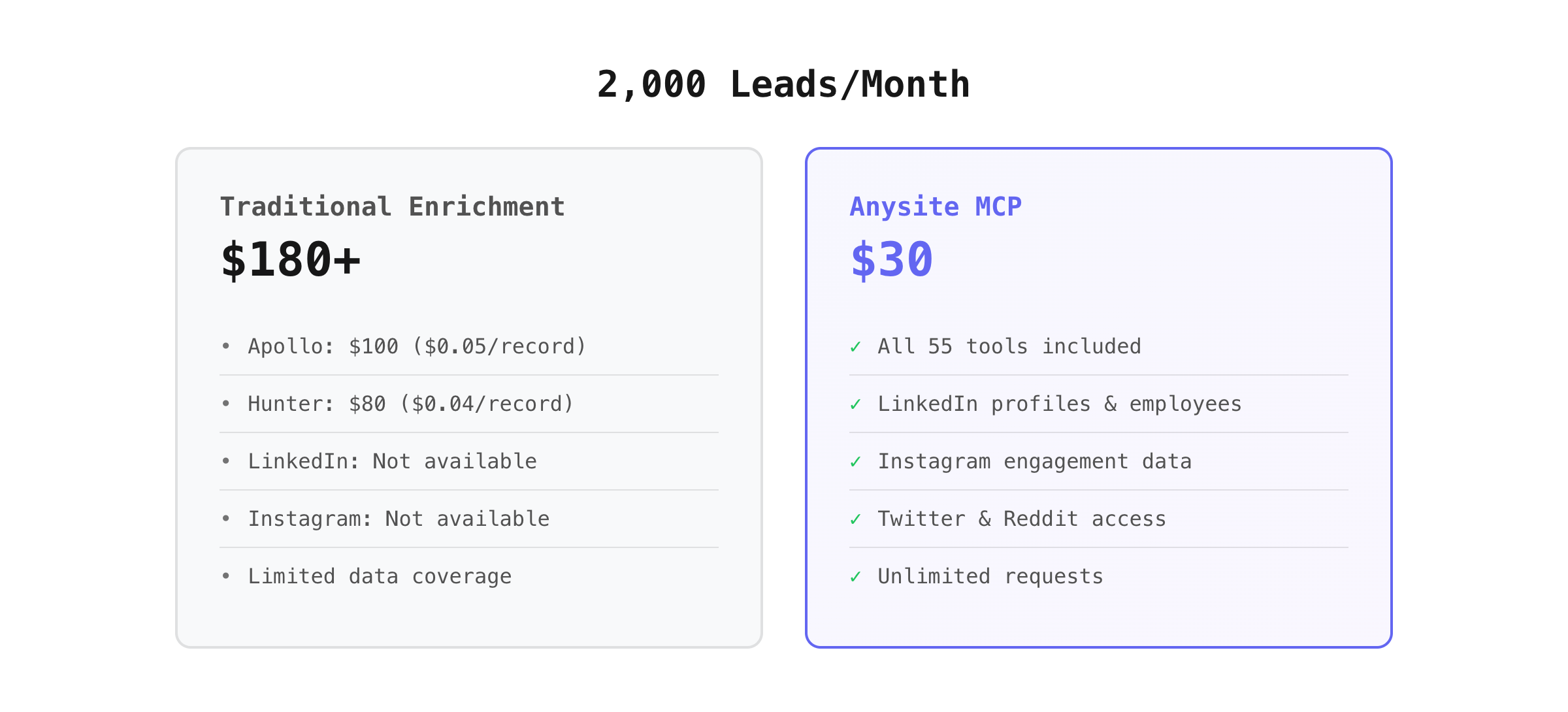
You save $150/month minimum — and you get social platform access that traditional enrichment APIs don't offer.
Scale to 10,000 leads? The Clay waterfall cost hits $900+. Anysite MCP stays at $30.
Setup and Authentication
Anysite MCP connects to Clay through a secure MCP URL that includes your authentication token.
Security notes:
- Keep your MCP URL private (it contains your auth token)
- Regenerate the URL anytime from app.anysite.io if needed
- Use Clay's permission controls to limit who can use the tool
The MCP URL format:
https://mcp.anysite.io/mcp?token=YOUR_AUTH_TOKEN
This URL goes into Clay's custom tools configuration. Once added, anyone in your Clay workspace with access to that tool can use it in tables.
Rate Limits and Fair Use
MCP Unlimited means no credit counting, but there are practical rate limits to prevent abuse:
- LinkedIn: ~100 requests/hour (platform limitation, not Anysite)
- Instagram: ~60 requests/hour
- Twitter: ~300 requests/hour
- Reddit: Unlimited (public API)
- Web scraping: Unlimited
These limits reset hourly and are enforced by the source platforms, not Anysite. You're not paying per request — you're just respecting platform rate limits to avoid blocks.
For most Clay workflows, these limits are more than sufficient. If you're hitting them regularly, reach out to discuss enterprise options.
What You Don't Get with MCP
MCP is designed for data extraction, not data enrichment in the traditional B2B sense.
Anysite MCP does not provide:
- Email address discovery (use Hunter, Apollo)
- Phone number lookup (use Lusha, ContactOut)
- Company firmographics like revenue, employee count (use Clearbit, ZoomInfo)
- Email verification (use NeverBounce, Hunter)
Anysite MCP does provide:
- Any data visible on LinkedIn, Instagram, Twitter, Reddit
- Company employee lists from LinkedIn
- Profile data, posts, followers, engagement metrics
- Search results across platforms
- Custom web page scraping
Use it for what it's built for: extracting structured data from social platforms and websites at unlimited scale.
Getting Started
Step 1: Subscribe to MCP Unlimited
Go to anysite.io/pricing and select MCP Unlimited ($30/month).
Once subscribed, you'll see the "MCP Server Integration" section in your dashboard.
Step 2: Get Your MCP URL
In app.anysite.io:
- Navigate to Settings → MCP Server
- Copy your unique MCP URL
- Note: This URL includes your auth token — keep it secure
Step 3: Add to Clay
In Clay:
- Go to Settings → Tools → Custom Tools
- Click "Add Custom Tool"
- Name: "Anysite MCP"
- Paste your MCP URL
- Save
Step 4: Use in Tables
Create a new enrichment column in any Clay table:
- Add column → Enrichment
- Select "Anysite MCP" from tools
- Write your query in natural language
- Run on selected rows
Example queries to try:
"Get the LinkedIn profile for {LinkedIn URL column}"
"Find employees at {Company Name} with 'engineer' in title"
"Get Instagram profile data for {Instagram Handle}"
Full setup guide with screenshots →
Questions
Can I use this with other tools besides Clay? Yes. Anysite MCP works with Claude Desktop, Claude Code, Cursor, n8n, and any MCP-compatible application. The same $30/month subscription gives you access everywhere.
What happens if I go over rate limits? You'll see a rate limit error in Clay. Wait an hour and retry. We don't charge overage fees — we just respect platform rate limits to keep your access stable.
Can I cancel anytime? Yes. MCP Unlimited is month-to-month. Cancel anytime from your dashboard.
Is there a free trial? Yes. Sign up for a free Anysite account and get 100 credits to test the API. Once you see the value, upgrade to MCP Unlimited for unlimited access.
Do I still need other enrichment providers? Probably. Anysite MCP is for social platform data extraction. You'll still want traditional enrichment APIs for email discovery, phone lookup, and company firmographics. Use them together.
Ready to stop paying per record? Set up Anysite MCP in Clay →