Product Hunt, Now Structured: The Endpoint Suite for Competitive Intelligence, Launch Monitoring, and Market Research
Product Hunt, Now Structured: The Endpoint Suite for Competitive Intelligence, Launch Monitoring, and Market Research
Product Hunt is a goldmine of structured market signal. Every product listing carries ratings, reviewer sentiment, feature-level feedback, and — buried in the reviews — a list of alternatives that real users considered when evaluating the product. What most teams miss is the layer underneath: the people. Makers, hunters, and commenters are first-class data on Product Hunt, and every one of them has a profile, a tool stack, and a cross-platform identity you can reach.
Until now, accessing any of this at scale meant navigating an unofficial API, writing custom parsers, or copying rows out of a browser. Anysite now exposes the full Product Hunt graph as structured, queryable data across a suite of endpoint families: products, launches, users, topics, collections, categories, and forums. This article walks through what each family returns, how they compose into research workflows, and the use cases where having this data programmatically makes a material difference.
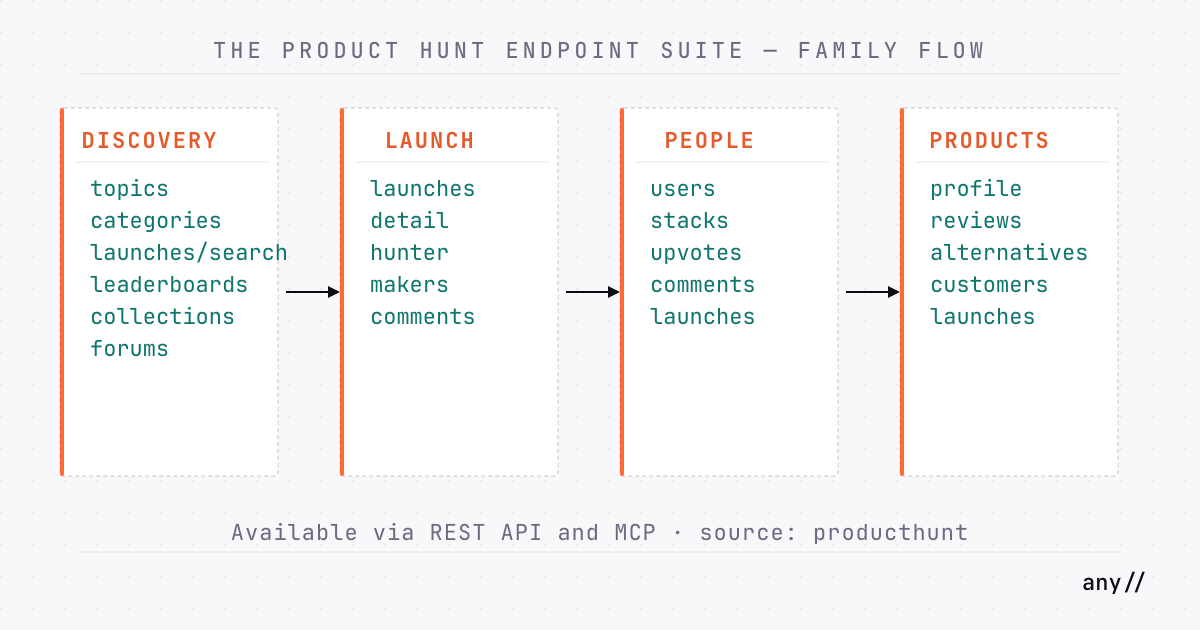
The Product Hunt suite covers the complete platform surface — product discovery and profiles, reviews and competitive alternatives, launch detail and leaderboard history, full people data (makers, hunters, commenters), and the topic and category taxonomy. All endpoints are POST, return structured JSON, and are accessible via the Anysite REST API and MCP Server using the producthunt source identifier.
The People Layer: Makers, Hunters, and Commenters
The most underutilized signal on Product Hunt is the people graph. A launch's hunter chose to champion a product to the community. Its makers built it. The top commenters are often practitioners in the space — sometimes competitors, sometimes customers. All of them are reachable through structured data.
This is what no generic Product Hunt scraper gives you: a path from a launch's discussion thread to a commenter's full profile, their tool stack, and the products they upvote.
Launch People: launches, launches/comments
The launches endpoint returns full detail for a single launch by slug or URL. Alongside the standard launch fields — id, alias, name, tagline, daily_rank, weekly_rank, upvote_count, launch_day_score, comment_count, badges[], topics[], media[] — it returns the people behind the launch:
hunter: the user who posted the launch to Product Huntmakers[]: the team behind the product
Both include enough identity data to start a profile lookup.
The launches/comments endpoint pulls the discussion thread under a launch. This is distinct from product reviews — it's where the community reacts in real time, and where makers often respond. Per comment, you get id, text, created_at, upvote_count, reply_count, is_sticky, is_pinned, parent_id, author, replies[] (nested), and — the key signal — badges[]. A badge value of maker or hunter tells you this commenter is on the product team or was the one who posted the launch. Top commenters with no badge are community members engaged enough to respond publicly.
// Request
{
  "source": "producthunt",
  "category": "launches",
  "endpoint": "launches_comments",
  "params": {
    "launch": "granola-2-0",
    "count": 20
  }
}

// Selected comment entry
{
  "text": "The team context sidebar is exactly what I needed...",
  "upvote_count": 14,
  "author": { "name": "...", "alias": "..." },
  "badges": ["maker"],
  "replies": [...]
}
User Profiles: users
Once you have a username from a hunter, maker, or commenter, the users endpoint returns the full profile. Key fields:
name,headline,twitter_username,links[](social accounts) — cross-platform identityis_maker,follower_count,following_count,submitted_post_count,product_countkp_month,kp_year,kp_all_time— Kitty Points rankings, a proxy for platform influencebadges[]— achievements and maker statusproducts[]— products this user is a featured maker on
twitter_username and links[] are the bridge to off-platform outreach. A commenter who left a thoughtful critique on a launch in your category has a product background you can verify, a Twitter handle you can find, and a tool stack you can query.
User Activity: Stacks, Upvotes, Comments
More user endpoints extend the profile into intent and behavior signals:
users/stacks — the tools a user keeps in their stack. This is what they actually use, not what they've reviewed or upvoted. Each stack entry includes name, tagline, alias, stack_count, and created_at (when they added it). A founder whose stack includes three developer-productivity tools and no note-taking apps is a different outreach target than one who has Granola, Notion, and Otter.ai.
users/upvotes — launches this user has upvoted, with rank, vote count, and nested product data. Affinity signal: what they find worth endorsing publicly.
users/comments — every comment a user has made, with context (the launch or forum thread where the comment appeared, including the parent product). Useful for understanding what topics they engage with across the platform.
users/launches — a maker's full launch history on Product Hunt, including products and launch dates. Useful for understanding their shipping cadence and market focus.
users/collections — curated lists they've created, with product previews.
From a Launch to an Outreach List
The workflow composes directly:
launches/searchto find launches in a categorylaunchesto pull the hunter and makers for eachlaunches/commentsto identify the most-engaged community commenters (filter byupvote_count, notebadges[])userson each username to gettwitter_username,links[],headline, andkp_all_timeusers/stacksto qualify intent: are they using complementary tools?
The result is a researched list of people who are active in your market, not a list of emails scraped from a landing page.
Products Family
The products family covers the persistent product record on Product Hunt — distinct from individual launches. A product may have launched multiple times; the products endpoints key on the product slug and return data aggregated across all its history.
Search: producthunt/products/search
Find products by keyword. Required params: keyword and count.
Returns per result: id, name, tagline, alias, url, rating, review_count, image, is_offline.
This is the entry point for product-centric research. You search for a category, a product name, or a technology term and get back a ranked list with ratings and review counts already attached. The alias from search results is what you pass to all subsequent product endpoints.
// Request
{
  "source": "producthunt",
  "category": "products",
  "endpoint": "products_search",
  "params": {
    "keyword": "granola",
    "count": 10
  }
}

// Sample result entry
{
  "id": "granola",
  "name": "Granola",
  "tagline": "The AI notepad for people in back-to-back meetings",
  "alias": "granola",
  "url": "https://www.producthunt.com/products/granola",
  "rating": 4.82,
  "review_count": 44,
  "is_offline": false
}
Full Profile: producthunt/products
Fetch the complete product record by slug or product URL. Required param: product. This endpoint costs 5 credits per call.
Returns a significantly richer object: all the search fields plus description, website_url, follower_count, post_count, founder_review_count, screenshots[], category, categories[], operating_system, price, currency, created_at, updated_at, first_launched_at, social links, authors[] (the PH-listed makers), and the fields that matter most for research: AI-tagged pros[] and cons[].
The pros and cons arrays are not raw review text. They are AI-summarized themes extracted from user reviews across the product's lifetime — a distilled consensus of what users find valuable and what they find lacking.
{
  "name": "Granola",
  "rating": 4.82,
  "review_count": 44,
  "follower_count": 1495,
  "price": 0,
  "categories": ["Meeting software", "AI notetakers"],
  "pros": [
    { "title": "AI transcription", "count": 9 },
    { "title": "meeting summaries", "count": 8 },
    { "title": "minimalist UI", "count": 7 }
  ],
  "cons": [
    { "title": "battery drain", "count": 1 },
    { "title": "project-management integration gap", "count": 1 }
  ],
  "authors": [
    { "name": "Mehedi" },
    { "name": "Ruari Shepard" },
    { "name": "Tikhon Belousko" }
  ],
  "first_launched_at": "2024-05-22"
}
Reviews: producthunt/products/reviews
Pull individual user reviews by product slug or URL. Required params: product and count.
This is the most data-dense endpoint in the products family. Per review, you get:
- Rating + breakdown: overall
ratingplusease_of_use_rating,reliability_rating,value_for_money_rating,customization_rating— four separate dimensions, not just a single score - Text fields:
text,overall_experience,positive_feedback,negative_feedback,alternatives_feedback - Structured sentiment:
pros[]andcons[]arrays at the individual review level - Alternatives named by the reviewer:
alternatives[]— competing products this user actually evaluated - Engagement signals:
vote_count,comment_count,impression_count,url question_answers[]andauthorfor additional context
The alternatives[] array within reviews is distinct from the products/alternatives endpoint. Where reviews surface products that real buyers named during their evaluation process, products/alternatives returns AI-computed similarity scores.
Alternatives: producthunt/products/alternatives
AI-computed competitor set. Required params: product and count.
Per alternative: id, alias, name, tagline, description, url, image, rating, review_count, follower_count, category, categories[], tags[], is_top_product, is_offline, embedding_summary, and similarity scores: combined_score, embedding_score, category_score, rating_score.
The combined_score ranks the full set based on embedding distance, category overlap, and rating signals — a different ordering from a naive rating sort. HyNote AI leads Granola's computed alternatives with a combined score of 5.70; Krisp follows with 46 reviews at 4.78.
Customers: producthunt/products/customers
The reverse stack: Product Hunt products that publicly use this product. Required params: product and count.
Per customer, the response includes standard product fields plus the fields that make this endpoint distinctive: shoutout (the testimonial quote) and author (who gave it).
Chronicle, Bluedot, Central (YC S24), Logo.dev, and ComputerX all appear in Granola's customer list. Each entry includes a verbatim testimonial — the actual quote from the product team that chose to feature Granola as part of their stack. For vendor evaluation, partnership research, or understanding a product's actual customer base, this endpoint provides evidence that no other data source in the platform exposes.
Products Launches: producthunt/products/launches
Full launch history for a product. Required params: product and count.
Per launch: id, alias, name, tagline, url, external_url, image, created_at, featured_at, updated_at, vote_count, launch_day_vote_count, comment_count, daily_rank, weekly_rank, monthly_rank, state, and awards[] (including Golden Kitty and TopPostBadge entries with position, period, and date).
Granola's launch history illustrates what this endpoint makes trackable. Their original 2024 launch reached daily rank 6. Granola 2.0 — launched a year later with the tagline "A second brain for your team" — earned a Top Post daily badge. The iOS launch outperformed it numerically and also earned a Top Post badge. That trajectory — vote_count, daily_rank, and awards[] across multiple launches — is the kind of data that competitive monitoring teams previously reconstructed manually from screenshots and spreadsheets.
Launches Family
The launches family keys on individual launch events, not persistent product records. A product may have several launches; launches/* endpoints let you work with a specific release.
Single Launch: producthunt/launches
Full detail of one launch by launch slug or URL. Returns everything the products family returns about a launch, plus launch-specific fields: launch_number, launch_date, scheduled_at, launch_day_score, launch_state, product_state, pricing_type, flags (is_top_launch, is_available, is_featured, is_launching_today, is_launched_this_week), media[] (screenshots and video), and links[].
Also returns hunter and makers[] — the people who made and posted the launch. This is where the people pipeline starts.
Launch Search: producthunt/launches/search
Search launches by keyword with an optional topic filter. Required params: keyword and count. Optional: topic (display name in title case, e.g. Productivity, Artificial Intelligence), featured (defaults to true).
Returns: id, name, alias, url, created_at, and parent product. Useful for cohort discovery: find all recent launches tagged to a topic area, then pull each for hunter/maker data.
Leaderboards: producthunt/leaderboards
Top-ranked launches for a given period and date. Required params: period (daily|weekly|monthly|yearly), date (period-matched: daily YYYY/M/D, weekly YYYY/W ISO-week, monthly YYYY/M, yearly YYYY), and count.
Per item: rank, id, name, tagline, launch_alias, product_id, product_alias, url, image, upvote_count, comment_count, daily_rank, weekly_rank, monthly_rank, featured_at, created_at, topics[].
This is the fastest way to get a snapshot of what performed in your category on a specific date. Pull the daily leaderboard for any date, filter by topic, and you have a ranked view of launch performance without touching a product slug first.
Discovery and Taxonomy: Topics, Categories, Collections
Topics: producthunt/topics
Topic pages aggregate the top products tagged to a concept. Params: topic (slug or URL) and count.
Returns: id, name, alias, description, url, image, parent, sub_topics[], categories[], category_tags[], ai_summary, recent_summary, total_product_count, recent_launch_count, and products[] (top products tagged to the topic).
The ai_summary and recent_summary fields are pre-computed by Product Hunt — a distilled view of what the platform currently says about a topic area.
Categories: producthunt/categories and categories/list
categories returns a category page by slug or URL: id, name, alias, description, url, parent, sub_categories[], questions[], top_products[], review_count, total_product_count, last_updated_at.
categories/list returns the full taxonomy tree, with each node including id, name, alias, url, description, and sub_categories[]. Useful for understanding Product Hunt's category structure before deciding which nodes to research.
Collections: producthunt/collections and collections/search
Collections are curated product lists. collections fetches a specific collection by slug or URL, returning id, alias, name, description, url, is_personal, curator (user profile), and products[].
collections/search browses or keyword-searches collections: keyword (optional — leave empty to browse alphabetically) and count. Returns per collection: id, alias, name, title, description, url, product_count, curator, and preview_products[].
Curated collections are a secondary signal for category research. A collection called "Best AI Meeting Tools" curated by an active product maker tells you something about the considered set in that space that a keyword search alone would miss.
Forums
Product Hunt's forum layer (/p/{forum}) carries discussion that isn't tied to a specific launch or product — it's where practitioners talk about the space in general.
producthunt/forums/search
Search forum threads. Params: forum (optional slug to scope, e.g. general), keyword (optional, cannot combine with forum), sort (trending|recent), and count.
Per thread: id, alias, title, text, url, author, forum (slug + category), created_at, vote_count, comment_count, is_featured, is_pinned.
producthunt/forums/threads
A single forum thread with its full comment tree. Params: thread (URL or {forum-slug}/{thread-slug}) and count.
Returns: id, alias, title, text, body_html, url, author, forum, created_at, vote_count, comment_count, page_view_count, is_featured, is_pinned, status, and comments[] (nested tree, each with author, text, vote_count, and replies).
Forum threads surface product opinions expressed outside of review prompts — more candid, often more specific about use-case context.
The Pipeline: Discovery → Launch → People → Profile
These families compose into research workflows. The shape of the workflow depends on your starting point.
Starting from a topic or category: Call topics or categories with a keyword slug. You get products[] and top_products[] — a ranked list without running a search. From there, pull launches/search with a topic filter to find recent launches in the space.
Starting from a launch: Call leaderboards for a period/date to find top-performing launches. Pull each launches record for hunter + makers. Pull launches/comments and filter by upvote_count to identify engaged community members. Note badges[] to distinguish team members from community.
Building a people list: Take any username — from a hunter, maker, or top commenter — and call users to get twitter_username, links[], headline, and kp_all_time rank. Call users/stacks to verify tool affinity. Call users/comments to understand topic engagement.
Building a competitive map: Call products/search with a keyword. Pull profiles selectively (5 credits per call) for the top results. Fan out to products/reviews for reviewer-named alternatives[] and feature-level rating breakdowns. Pull products/alternatives for AI-computed similarity scores. Pull products/customers for reverse-stack testimonials.
Which families you call depends on your research goal. Competitive intelligence favors reviews and alternatives. Launch monitoring uses leaderboards and products/launches. People research chains from comments through user profiles. A full landscape map uses the complete suite.
Use Cases
People and Outreach Intelligence
The people layer is the differentiator of this suite. From a launch's commenters to their full profile, stack, and the tools they champion: that's a path that previously required cross-referencing four different platforms manually.
Makers (launches.makers[], products.authors[]) and hunters (launches.hunter) are the obvious starting points — they're associated with products in your space and their profiles are structured. The less obvious starting point is top commenters. A person who comments substantively on five launches in your category, earns upvotes from other practitioners, and has a stack full of complementary tools is a high-signal prospect. launches/comments with badges[] filtering is how you find them.
From each username, users returns twitter_username and links[] for cross-platform identity. users/stacks returns intent evidence. users/comments shows what topics they engage with. The outreach list you build from this data is structured and researched, not scraped from a directory.
Competitive Intelligence
The alternatives[] array in the reviews endpoint gives you products that real buyers named during their evaluation process. Aggregate that across dozens of reviews and you have a frequency distribution of which products appear together in consideration sets.
The products/alternatives endpoint adds a second layer: AI-computed structural similarity via embedding distance, category overlap, and rating distribution. Pair both alternative signals with the feature-level rating breakdown from reviews (ease_of_use_rating, value_for_money_rating, reliability_rating, customization_rating) and you have a mapped competitive landscape.
Launch Monitoring
Product Hunt launches are time-sensitive. A product that ships at midnight Pacific competes for "Product of the Day" against everything else in that 24-hour window. The leaderboards endpoint makes this trackable without manual work.
Pull the daily leaderboard (period: daily) for any date and you get a ranked view of every launch that competed that day. products/launches gives you the historical trajectory for any product — vote_count, daily_rank, weekly_rank, monthly_rank, and awards[] across every launch in their history.
The is_offline flag in the search response stays useful alongside rank history: a product that launched with high vote counts but is now offline tells a different story than one with sustained engagement across multiple launches.
Market and Trend Research
Search for a technology keyword — mcp, ai agent, llm — via launches/search with a topic filter and you get a dataset of every recent Product Hunt launch tagged with that concept. topics returns an ai_summary and recent_summary that the platform pre-computes. Pull reviews and alternatives across a cohort and you have primary research data: what users value, what they complain about, which alternatives buyers name most often.
collections/search adds a curatorial layer: what do active Product Hunt users call the category, and which products do they group together?
Forums add a third signal. forums/search with a keyword finds discussions that aren't tied to specific launches — the kind of candid product opinions that practitioners express when they're not writing a formal review.
Adoption and Reverse-Stack Mapping
The products/customers endpoint surfaces a signal that the rest of the suite doesn't: who builds on a product, at what maturity level, and with what testimony.
Chronicle calling Granola "an essential part of how we capture thinking" is not phrased as a review. It is a product team's public statement about a tool in their operational stack. Central (YC S24) calling it "one of the best tools to organize your notes during calls" is an endorsement from a recently funded startup. These are structured data, queryable alongside the adopting product's own rating, review count, and categories.
For vendor evaluation, partnership research, or understanding a product's actual customer base beyond its marketing claims, this endpoint provides evidence that no other data source in the platform exposes.
How to Access
All endpoints are available through the Anysite REST API and MCP Server using the producthunt source identifier. They follow the same request/response format as every other Anysite endpoint: structured JSON, consistent schema, POST requests with access-token header.
REST API example:
curl -X POST "https://api.anysite.io/api/producthunt/users" \
  -H "access-token: YOUR_API_KEY" \
  -H "Content-Type: application/json" \
  -d '{"user":"kevin"}'
MCP: Ask in natural language — "pull the top commenters on the Granola 2.0 launch with maker badges" or "get the weekly leaderboard for the second week of May 2025" — and the MCP Server routes the request to the correct endpoint automatically.
Full endpoint documentation: docs.anysite.io/api-reference/producthunt/producthuntproducts
Product Hunt Now Joins the Platform Surface
Product Hunt joins LinkedIn, Instagram, Twitter, Reddit, YouTube, Crunchbase, SEC, Y Combinator, and Google Maps as a first-class data source in Anysite.
The addition matters because Product Hunt occupies a specific role in the startup data ecosystem: it is where products launch, where early users leave structured feedback, and where the people behind products — makers, hunters, active community members — are identifiable and reachable. That people layer is the part that was previously hardest to access at scale, and it is where this suite's differentiation sits.
The endpoints above eliminate the engineering requirement. The data is now structured, queryable, and composable with every other source in the platform — which means a research pipeline that combines Product Hunt's people and launch data with company records from Crunchbase, founder backgrounds from LinkedIn, and community discussion from Reddit is now reachable through a few calls.
API reference and endpoint documentation: docs.anysite.io/api-reference/producthunt/producthuntproducts