
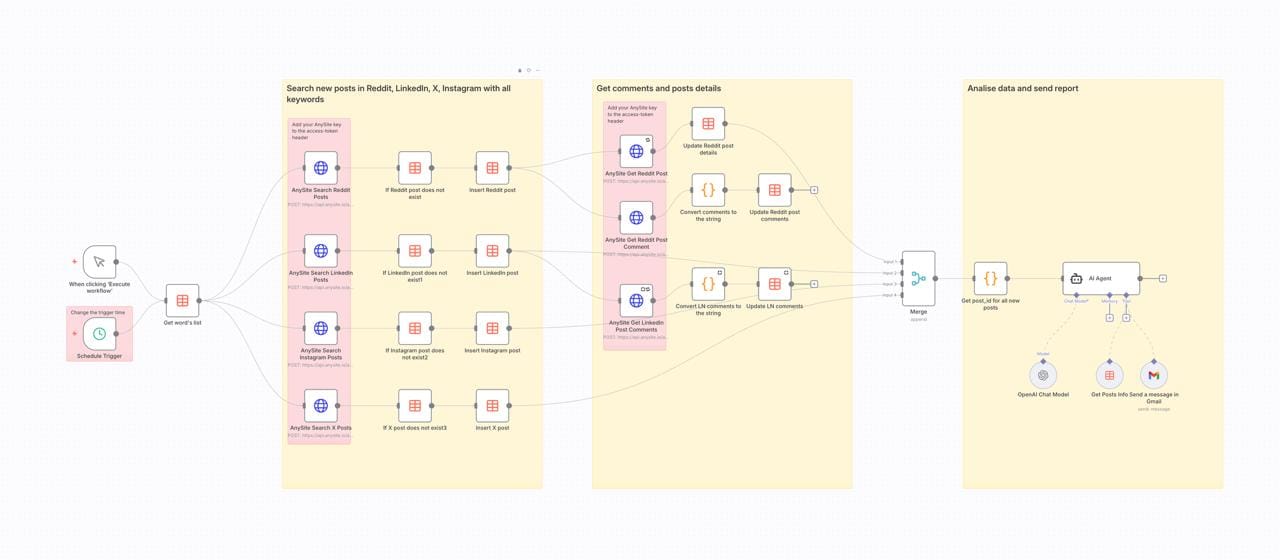
Enterprise social listening tools like Hootsuite, Sprout Social, and Brandwatch charge $500-2,000 per month for brand monitoring features. For many teams—especially startups, agencies, and technical organizations—that's unsustainable. But what if you could build your own production-ready social listening system for $100-250/month with complete control over data, analysis, and integrations?
This comprehensive guide walks you through building a cross-platform brand monitoring system using n8n workflow automation, Anysite's unified social media API, and GPT-4 for AI analysis. The result: automated monitoring across Reddit, LinkedIn, X (Twitter), and Instagram with intelligent sentiment analysis and automated reporting—all running on infrastructure you control.
What you'll learn:
- Complete n8n workflow setup for multi-platform social listening
- How to use Anysite API for unified social media data access
- AI-powered sentiment analysis with GPT-4
- Cost comparison: DIY vs enterprise tools
- Production deployment best practices
Who this is for: Developers, product teams, marketing managers, and technical founders who want enterprise-grade social listening without enterprise pricing.
The Case Against Enterprise Social Listening Tools
Before diving into the technical solution, let's examine why traditional social listening platforms may not be your best option:
Pricing That Doesn't Scale
Enterprise Tool Pricing (2025):
- Sprout Social: $249-499/month per user (Advanced/Enterprise plans required for full listening)
- Hootsuite: $739-1,499/month (Team/Business plans)
- Brandwatch: $800-2,000+/month (custom pricing, annual contracts)
- Mention: $99-299/month (limited platform coverage at lower tiers)
For a small team of 3-5 people, you're looking at $2,000-5,000/month minimum. That's $24,000-60,000 annually for social listening alone.
Limited Flexibility and Data Lock-In
Enterprise tools provide dashboards and reports, but:
- No raw data access: You can't export mentions for custom analysis
- Fixed analysis models: Stuck with their sentiment algorithm and categories
- Integration limitations: APIs often restricted to enterprise plans
- Platform dependencies: If Reddit or LinkedIn changes policies, you wait for vendor updates
One-Size-Fits-All Analysis
Most tools use generic sentiment models trained on consumer brands. If you're:
- A B2B SaaS company with technical discussions
- A developer tools provider with GitHub and Reddit focus
- A niche industry with specialized terminology
...their sentiment analysis often misclassifies neutral technical discussions as negative, or misses domain-specific context.
Why Build Your Own Social Listening System?
The DIY approach using n8n workflow automation offers compelling advantages:
Cost Efficiency: Running costs of $100-250/month vs $500-2,000+ for enterprise tools
Complete Control: Own your data, customize analysis, integrate anywhere
Flexibility: Add platforms, modify logic, train custom AI models
Transparency: See exactly how data flows and decisions are made
Scalability: Start small, expand as needed without vendor negotiations
Most importantly: You can start today. The entire setup takes 2-3 hours, and you can iterate based on real results rather than committing to annual contracts.
Introducing the n8n Brand Monitoring Agent
The n8n Social Media Brand Monitoring workflow addresses these gaps by combining workflow automation, unified data access, and AI-powered analysis into a single system that runs continuously without manual intervention.
Here's what this automated system delivers:
Cross-Platform Data Collection
The workflow monitors four major social platforms simultaneously:
- Reddit: Tracks discussions in relevant subreddits, captures upvotes/downvotes, identifies trending threads, and analyzes comment sentiment across communities.
- LinkedIn: Monitors professional conversations, company mentions, thought leadership posts, and engagement from target accounts or industries.
- X (formerly Twitter): Tracks hashtags, @mentions, quote tweets, and conversations in your industry or around competitors.
- Instagram: Analyzes posts, stories, hashtag performance, influencer mentions, and visual content trends.
Unlike traditional tools that require separate integrations for each platform, this workflow uses Anysite's unified API to access all four platforms through a single, consistent interface.
Intelligent Data Processing
Raw social media data is noisy. The workflow implements several layers of processing:
Deduplication: Before storing posts, the system checks if content already exists in your database. This prevents processing the same viral thread multiple times and keeps your data clean.
Comment Enrichment: For platforms like Reddit and LinkedIn, the workflow doesn't just capture top-level posts—it retrieves full comment threads. This is where real sentiment and detailed feedback often live.
Structured Storage: All collected data flows into n8n Data Tables with consistent schema across platforms. This makes cross-platform analysis possible and enables historical trend tracking.
AI-Powered Analysis and Reporting
The most powerful component is the AI analysis layer. Rather than dumping raw posts into a spreadsheet, the workflow uses OpenAI's GPT-4 to:
- Aggregate Mentions: Groups related conversations across platforms to identify coordinated campaigns or organic trends.
- Sentiment Analysis: Evaluates tone, urgency, and emotional context—not just keyword matching.
- Risk Detection: Identifies potential PR issues, angry customers, or emerging controversies before they escalate.
- Engagement Insights: Analyzes what content drives discussion, which platforms generate most buzz, and which influencers amplify your message.
- Executive Summaries: Generates human-readable reports with key findings, trends, and recommended actions.
Automated Delivery
Once analysis completes, the workflow automatically sends a formatted HTML email report via Gmail. No logging into dashboards, no manual report generation—intelligence arrives in your inbox on schedule.
How It Works: Technical Architecture
Understanding the workflow architecture helps you customize it for your specific needs. Here's the step-by-step execution flow:
1. Trigger and Initialization
The workflow supports two trigger modes:
// Schedule Trigger - Runs automatically
// Example: Every day at 9 AM
schedule: "0 9 * * *"

// Manual Trigger - On-demand execution
// Useful for testing or ad-hoc analysis
When triggered, the workflow first loads all monitored keywords from the Brand Monitoring Words table. This table acts as your configuration—add a keyword, and the next run automatically includes it.
2. Multi-Platform Data Collection
For each keyword, the workflow makes parallel API calls to Anysite's endpoints:
// Reddit Search
POST https://api.anysite.io/reddit/search/posts
{
  "query": "your-brand-name",
  "count": 50,
  "sort": "relevance",
  "time_filter": "day"
}

// LinkedIn Search
POST https://api.anysite.io/linkedin/search/posts
{
  "keywords": "your-brand-name",
  "date_posted": "past-24h",
  "count": 50
}

// X/Twitter Search
POST https://api.anysite.io/twitter/search/posts
{
  "query": "your-brand-name",
  "count": 50,
  "search_type": "Latest"
}

// Instagram Search
POST https://api.anysite.io/instagram/search/posts
{
  "query": "your-brand-name",
  "count": 50
}
Each API call returns structured JSON with consistent fields across platforms. Anysite handles the complexity of platform-specific authentication, rate limiting, and data normalization.
3. Deduplication and Storage
Before saving, the workflow checks if each post already exists:
// Deduplication logic
const existingPosts = await dataTables.query({
  table: "Brand Monitoring Posts",
  filter: `post_id = "${newPost.id}" AND type = "${platform}"`
});

if (existingPosts.length === 0) {
  // New post - save it
  await dataTables.insert({
    table: "Brand Monitoring Posts",
    data: {
      type: platform,
      post_id: newPost.id,
      title: newPost.title,
      text: newPost.text,
      url: newPost.url,
      created_at: newPost.created_at,
      vote_count: newPost.votes,
      comment_count: newPost.comments.length,
      word: keyword
    }
  });
}
This ensures your database contains unique posts only, even if the same viral thread mentions your brand multiple times.
4. Comment Retrieval
For deeper analysis, the workflow fetches comments for Reddit and LinkedIn posts:
// Fetch Reddit post comments
const comments = await anysite.reddit.getComments({
  post_url: postUrl,
  depth: 2, // Get replies to comments too
  sort: "top"
});

// Format as JSON string for storage
const formattedComments = JSON.stringify(comments.map(c => ({
  author: c.author,
  text: c.body,
  score: c.score,
  created: c.created_at
})));

// Update post record with comments
await dataTables.update({
  table: "Brand Monitoring Posts",
  id: postId,
  data: { comments: formattedComments }
});
Comments often contain more detailed feedback, feature requests, and sentiment than the original post.
5. AI Analysis
Once all data is collected, it flows to the AI Agent node powered by GPT-4:
// AI Agent system prompt (simplified)
const systemPrompt = `
You are a social media intelligence analyst. Analyze brand mentions across platforms and provide:

1. Executive Summary: 2-3 sentence overview of brand sentiment and key themes
2. Platform Breakdown: Engagement and sentiment by platform (Reddit, LinkedIn, X, Instagram)
3. Trending Topics: What themes are emerging in conversations
4. Sentiment Analysis: Overall tone (positive/negative/neutral) with examples
5. Risk Signals: Any potential PR issues or customer complaints requiring attention
6. Engagement Insights: What content/topics drive most discussion
7. Recommendations: 3-5 actionable next steps

Format as HTML email for executive readability.
`;

const posts = await dataTables.query({
  table: "Brand Monitoring Posts",
  filter: `created_at > "${last24Hours}"`
});

const analysis = await openai.chat({
  model: "gpt-4o",
  messages: [
    { role: "system", content: systemPrompt },
    { role: "user", content: JSON.stringify(posts) }
  ]
});
The AI doesn't just count mentions—it understands context, identifies patterns, and generates strategic insights.
6. Report Delivery
The final step sends the AI-generated report via Gmail:
// Send report email
await gmail.sendMessage({
  to: "team@yourcompany.com",
  subject: `Social Media Intelligence Report - ${today}`,
  html: analysis.content,
  from: "monitoring@yourcompany.com"
});
Your team receives actionable intelligence without needing to check multiple platforms or dashboards.
Setup Guide: Building Your Own Brand Monitoring System
Ready to implement this for your brand? Here's the complete setup process:
Prerequisites
Before starting, you'll need:
- n8n instance: Either n8n Cloud (easiest) or self-hosted (more control)
- Anysite API key: Sign up at anysite.io for API access
- OpenAI API key: For GPT-4 powered analysis
- Gmail account: For report delivery (or substitute any email service)
Step 1: Import the Workflow
Download the workflow JSON from the n8n workflow library and import it into your n8n instance:
- Open n8n
- Click "Workflows" → "Import from File"
- Select the downloaded JSON file
- The complete workflow will appear in your editor
Step 2: Configure Credentials
Set up authentication for each service:
Anysite API:
- In n8n, go to "Credentials" → "Create New"
- Select "Header Auth"
- Name: "Anysite API"
- Add header:
access-token: YOUR_API_KEY
OpenAI:
- Create credential type "OpenAI"
- Add your API key from platform.openai.com
Gmail:
- Create credential type "Gmail OAuth2"
- Follow OAuth flow to authorize n8n
Step 3: Create Data Tables
Set up two data tables in n8n to store keywords and results. See the full article for detailed table schemas.
Step 4: Customize the AI Prompt
Edit the AI Agent node to customize analysis for your needs based on your specific industry and monitoring goals.
Step 5: Configure Schedule
Set the Schedule Trigger to run at your preferred frequency (daily, every 6 hours, weekly, etc.).
Step 6: Test and Activate
- Click "Execute Workflow" to test manually
- Verify posts are collected and stored correctly
- Check that the email report arrives and renders properly
- Activate the workflow for automatic execution
DIY vs Enterprise Social Listening: Feature Comparison
| Feature | Enterprise Tools | DIY n8n Solution |
|---|---|---|
| Monthly Cost | $500-2,000+ | $100-250 |
| Platform Coverage | 4-8 platforms | 4+ (Reddit, LinkedIn, X, Instagram + custom) |
| Sentiment Analysis | Generic models | GPT-4 (contextual, customizable) |
| Data Ownership | Vendor-controlled | Full ownership |
| Custom Integrations | Limited API access | Unlimited (1,000+ n8n nodes) |
| Setup Time | Weeks (sales, onboarding) | 2-3 hours |
| Flexibility | Fixed dashboards | Fully customizable |
From $2,000/Month to $200/Month: Is It Worth It?
Real ROI Example:
A SaaS startup monitoring 10 keywords across 4 platforms:
- Enterprise tool: $749/month (Hootsuite Business) = $8,988/year
- n8n solution: ~$200/month = $2,400/year
- Annual savings: $6,588
That's 1-2 months of additional runway, a junior marketing hire, or significant paid acquisition budget.
Next Steps and Resources
Required Services:
- n8n: Start with n8n Cloud ($20/month) or self-host free
- Anysite API: Sign up at anysite.io - pricing varies by usage
- OpenAI API: Get keys at platform.openai.com
Complete Workflow:
Download and import from n8n workflow library
Anysite Model Context Protocol:
For even deeper integration, explore Anysite's MCP server that connects AI agents directly to social platforms. This enables more advanced use cases like automated responses, follow-up campaigns, and multi-step workflows.
The era of paying thousands per month for social listening is ending. With modern workflow automation and AI, you can build enterprise-grade systems on startup budgets. Start today, iterate based on results, and own your brand intelligence infrastructure.